1. Open your first file#

Microscopy comes in incompatible containers: Nikon writes ND2, Zeiss writes CZI,
everyone else writes TIFF — as one big stack, or as a folder with one file per
timepoint. acia gives you one function for all of them.
By the end of this notebook you will be able to open any of those formats, read what is inside without loading pixels, and pull out a single position as a time series ready for analysis.
# On Colab (or any fresh environment) this installs acia.
# Locally, if you already have acia installed, it is a no-op.
try:
    import acia  # noqa: F401
except ImportError:
    %pip install -q acia
Get some data#
We use a small slice of a public time-lapse so this notebook runs anywhere. Rather than pulling the whole 800-frame archive, we fetch 20 individual frames straight out of the share.
Note
The sample is a microfluidic live-cell imaging time-lapse of a Corynebacterium glutamicum microcolony growing in a cultivation chamber, imaged in phase contrast at 0.072 µm/pixel and a 1 minute frame interval. It is the same public dataset the acia-workflows case studies use.
The full sequence is 800 frames; we fetch every 20th frame of the first 400, which is ~20 MB rather than ~800 MB, and gives us a colony doubling a couple of times.
from pathlib import Path
from urllib.request import (
    HTTPBasicAuthHandler,
    HTTPPasswordMgrWithDefaultRealm,
    build_opener,
    install_opener,
    urlretrieve,
)

# A public ownCloud share. The share token acts as the username, so single
# frames can be fetched over WebDAV instead of downloading the whole 800-frame,
# ~800 MB archive.
SHARE = "D0A9ftcpqwKm1Rq"
BASE = "https://fz-juelich.sciebo.de/public.php/webdav"
SEQUENCE = Path("data/colony")

N_FRAMES = 20  # of 800 available
FRAME_STEP = 20  # every 20th frame -> 20 minutes between the frames we keep

mgr = HTTPPasswordMgrWithDefaultRealm()
mgr.add_password(None, BASE, SHARE, "")
install_opener(build_opener(HTTPBasicAuthHandler(mgr)))

SEQUENCE.mkdir(parents=True, exist_ok=True)
for i in range(N_FRAMES):
    name = f"t{i * FRAME_STEP:04d}.tif"
    target = SEQUENCE / name
    if not target.exists():
        urlretrieve(f"{BASE}/00/{name}", target)

print(SEQUENCE, "->", len(list(SEQUENCE.glob("*.tif"))), "frames (~1 MB each)")
data/colony -> 20 frames (~1 MB each)
One function for every format#
open_sequence() dispatches on what you hand it — a
.nd2 file, a .czi file, a .tif stack, or a directory of per-timepoint
TIFFs — and returns a SequenceFile.
The important property is that it is lazy. Constructing it reads no pixel data at all, which is what makes it usable on the hundred-gigabyte acquisitions these formats are built for.
from acia.segm.open import open_sequence

seq = open_sequence(SEQUENCE)
seq
<acia.segm.open.SequenceFile at 0x7fedec938a90>
What is in the file?#
SequenceFile.metadata answers that without touching the pixels.
meta = seq.metadata

print("axis sizes     ", meta.sizes)
print("timepoints     ", meta.num_timepoints)
print("positions      ", meta.num_positions)
print("channels       ", meta.channels)
print("dtype          ", meta.dtype)
print("pixel size     ", meta.pixel_size)
print("frame interval ", meta.frame_interval)
axis sizes      {'T': 20, 'Y': 1094, 'X': 938, 'C': 1}
timepoints      20
positions       1
channels        ['ch0']
dtype           uint8
pixel size      None
frame interval  None
Two of those deserve comment.
pixel_size and frame_interval are None here. That is not a failure —
these TIFFs simply carry no OME or ImageJ calibration tags, and acia reports
what the file actually says rather than inventing a plausible number. For ND2
and CZI, and for TIFFs written with calibration, these come back populated.
You will supply them by hand in
tutorial 4.
Note also that the frames we downloaded are every 20th frame of a sequence
acquired at 1 minute intervals — so the interval of this folder is 20 minutes,
not 1. acia cannot know that; you have to tell it.
sizes has no Z. acia is a 2D+t library — it models time-lapses of a
single focal plane. The ND2 and CZI readers reject a file with Z > 1 rather
than silently picking a plane for you.
Positions#
A “position” is one field of view within a multi-position acquisition — the ND2
P axis, the CZI S (scene) axis, or one subfolder of a folder tree. acia
unifies all three so your code never branches on format.
for pos in seq.positions:
    print(pos)
PositionInfo(index=0, name=None, stage_xy=None)
From file to time series#
seq.position(i) gives you an ImageSequenceSource — the
abstraction the rest of the library speaks. It is sized, iterable, and indexable.
src = seq.position(0)

print(type(src).__name__)
print("frames         ", len(src))
print("size (T,H,W,C) ", (src.size_t, src.size_h, src.size_w, src.size_c))
FolderSequenceSource
frames          20
size (T,H,W,C)  (20, 1094, 938, 1)
Grabbing a single frame gives a BaseImage; its .raw attribute is the numpy
array, always shaped (H, W, C).
import numpy as np

frame = src[0]
array = np.asarray(frame.raw)

print(type(frame).__name__, array.shape, array.dtype)
print("intensity range", array.min(), "-", array.max())
LocalImage (1094, 938, 1) uint8
intensity range 2 - 116
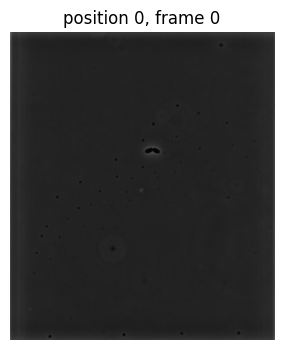
A quick look#
thumbnail() reads exactly one downscaled frame — the cheapest possible way to
check you opened the right thing.
import matplotlib.pyplot as plt

thumb = np.asarray(seq.thumbnail(0, downscale=2))

plt.figure(figsize=(4, 4))
plt.imshow(thumb.squeeze(), cmap="gray")
plt.title("position 0, frame 0")
plt.axis("off")
plt.show()
The other formats#
Exactly the same three lines, pointed at a different file. These need their
optional extra installed (pip install acia[nd2] or acia[czi]) and are not
executed here because we have no sample ND2/CZI to ship:
# Nikon ND2 -- position 2 of a multi-position acquisition
seq = open_sequence("experiment.nd2")
src = seq.position(2)

# Zeiss CZI -- scene 0
seq = open_sequence("experiment.czi")
src = seq.position(0)

# a single multi-page TIFF stack
seq = open_sequence("experiment.tif")
src = seq.position(0)

# a folder whose SUBFOLDERS are positions, each holding per-timepoint TIFFs
seq = open_sequence("experiment_folder/")
print(seq.num_positions)
If you would rather construct a reader directly — because you want to pass
reader-specific options — the classes are
ND2SequenceSource,
CZISequenceSource,
LocalSequenceSource and
FolderSequenceSource. open_sequence just
picks the right one for you.
Reading from an SMB share or S3 works too, with credentials kept out of your code — see Reading from remote storage (SMB, S3, …).
What you learned#
open_sequence()opens ND2, CZI, TIFF stacks and TIFF folders through one API, without reading pixels.SequenceFile.metadatatells you axis sizes, channels, dtype and calibration — and reportsNonerather than guessing when the file has no calibration.SequenceFile.position(i)hands you anImageSequenceSource, which is what every other part ofaciaconsumes.
Next: 2. The sequence model — how to slice, crop and subsample that source without copying a single pixel.